How I worked through half a million records to help a controller investigate a cash difference.
A controller asked me for help with a cash difference in his summary reports. He could see the gap, but he was almost sure it wasn't real. If that much money were missing, he thought, the billing team would have caught it already.
To find out, he needed to get into the detail across accounting, billing and payment processors. He described it as a complex problem he had no time to solve. I wanted to see whether I could give him a useful answer from the exports he already had.
There were seven reports for the month, covering roughly half a million records. More than 130,000 invoices sat in each of the accounting and billing systems, alongside billing payments and merchant payment events. I needed to test the full population and give him something he could trace back to individual records.
Getting the data ready
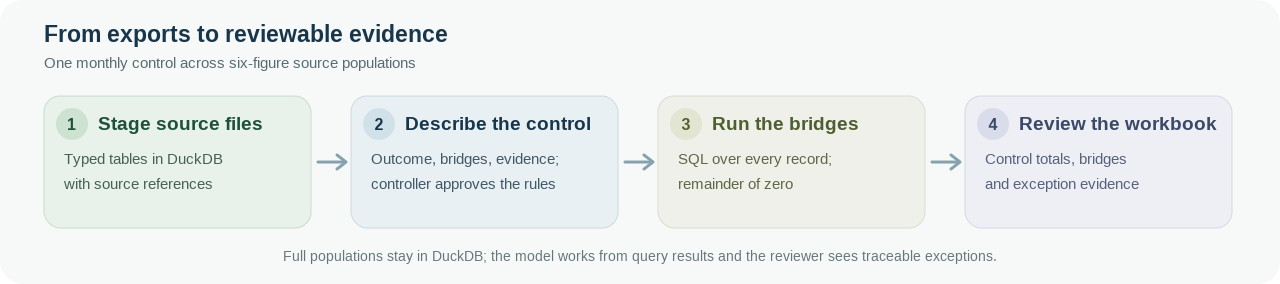
My first concern was the volume. Passing all those rows to a language model would use time and tokens reading transactions that already tied out. Then I had what felt like a brilliant idea: put the exports in a database and let the model query it. That led me to DuckDB, which I hadn't heard of before. It ran locally, so I loaded the exports and had the model write the SQL.
DuckDB ran those queries over every record. The model worked from headers, sample rows, totals and exceptions. Each staged record kept its original file and row so I could follow a finding back to its source.
I checked the source totals before looking at differences between systems. One processor report had five lines of preamble above its real header; my first pass treated them as data until the totals came out wrong. Rebuilding each report from its detail helped catch that kind of mistake.
The repeated staging steps now live in the month-end-controls skill. That lets me describe the reconciliation I want without spelling out the data preparation each time.
The prompt I used
With the control and July period already created, this was the request:
Use the month-end-controls skill. Controls root: ~/Controls. Control: o2c (already created; July 2026 is open).

My source reports are in this folder (outside the controls root): ~/sources/o2c/202607

There are 7 reports for one client's order-to-cash: July 2026

prove the accounting and billing reports against their detail. Match invoices and credit notes across those systems, then match billing payments to merchant gross. Show supported timing and scope exclusions separately. Put every unexplained difference, including report-level gaps with unknown records, into an exception list. Do not treat missing evidence as a match.
Deliver one workbook with four tabs:

Control: each report's headline total against its rebuilt detail, and what ties.
System Bridges: small tables stacked down the sheet, each with a Count and Amount column. Start with one table per source that rebuilds its total from the detail and ends with the gap to the official report. Then add one table per bridge that sorts every record into an outcome and ends with an unclassified remainder of zero.
Exception Summary: one row per category, with count, amount, status and next action.
Exception Detail: one row per record, with its IDs on both sides and its source file and row.
	Style it like a clean finance workbook: navy headers, light-blue column headings, red brackets for negatives, and yellow for anything still open.
What came back
I tested the approach with a fresh agent, the seven exports and no prior conversation, file mappings, matching keys or client rules. It staged the files, identified the links between systems and returned the four-tab workbook in under fifteen minutes.
I compared it with the control I had built by hand. It agreed on the main categories: merchant events without billing records, shared gateway IDs with different amounts, period differences and a business entity outside the accounting population.
The workbook separated two reconciliations. The document bridge linked accounting invoices and credit notes to billing documents. The payment bridge linked billing payments to merchant events on gross amount, before fees and payouts. Every record had an outcome, including those left as unresolved exceptions.
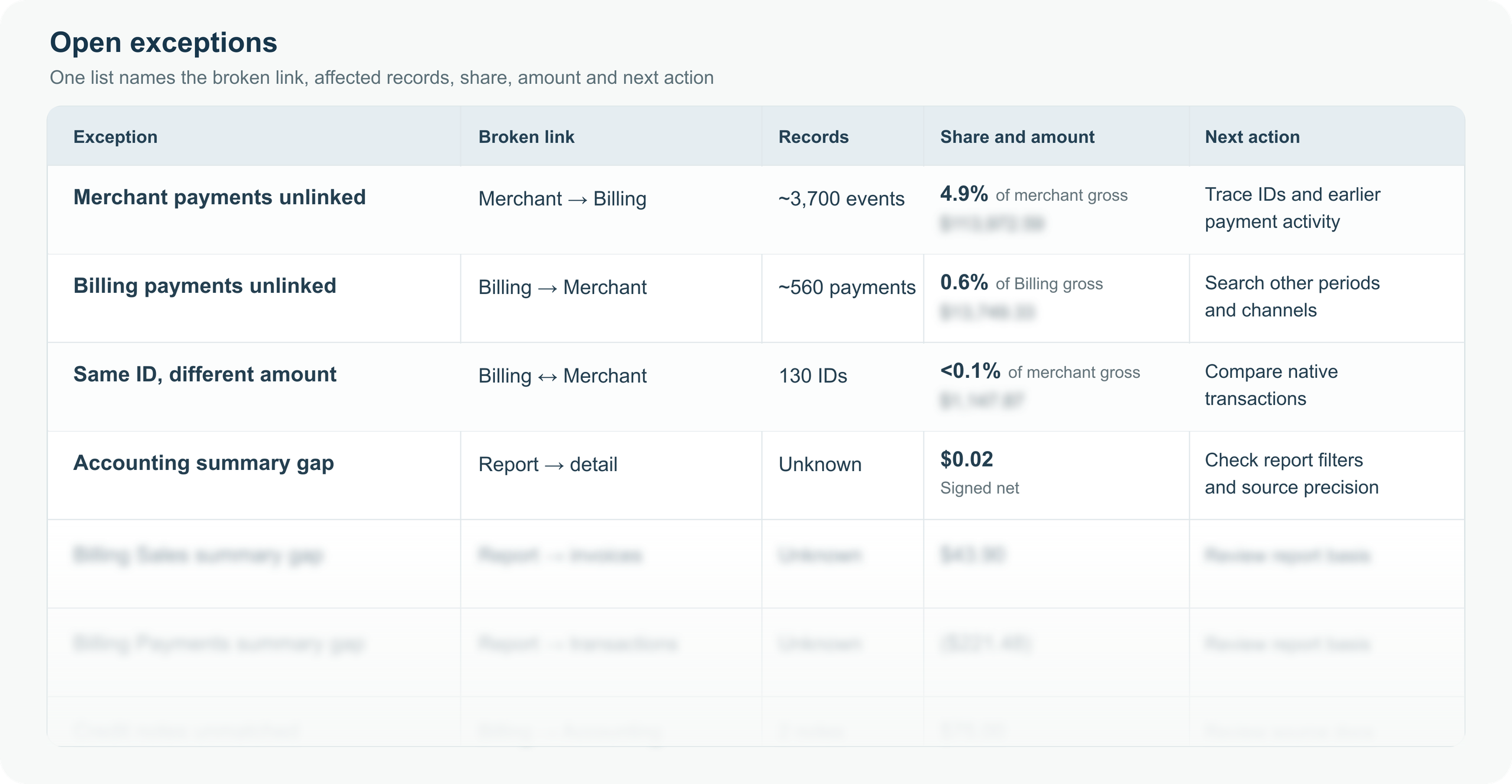
On the full month, about 95% of merchant gross matched billing payments exactly on ID and gross amount. Roughly 3,700 merchant events, just under 5% of gross, had no billing record. About 1,800 billing invoices, under 1% of billing value, were missing from the accounting export. I kept those as evidence gaps to investigate; the export alone didn't prove a sync failure.
What I still had to review
The agent left me with decisions to confirm: whether a business-entity exclusion applied to payments as well as documents, whether offline payments belonged in the payment bridge, and how to treat credit notes that nearly matched.
It also reported a gap that didn't survive review. It had compared a processor's running balance with a file containing only part of the month's activity. The missing rows explained the difference.
That was a useful reminder to check the logic as carefully as the output. I needed to approve the matching rules and review the exceptions. A bridge with no unclassified remainder showed that every record had been accounted for; it didn't mean every difference was resolved.
I also kept the scope clear. This control stopped at merchant gross. It did not establish that payouts reached the bank or that cash, fees, clearing and receivables were correct in the ledger. Those checks need settlement files, bank statements and certified opening balances.
The initial work took an afternoon, including deciding what the control should prove. At the end, I could give the controller specific records to take to his billing team, with a source file and row behind each one. The difference still needed work, but he could see where to start.
Try it on your own exports
I ran this in the Claude desktop app's Code tab with access to my local files. The month-end-controls skill and the prompt are available below.
Give it the raw exports, not a copy you have already tidied up. It will propose the matching rules, and those are worth reading properly, because everything in the workbook rests on them. Then check the workbook yourself before you act on anything in it.