Why we take an accountant’s workbook in, give a workbook back, and lock what runs in between.
A lot of close work is being rebuilt with AI right now, and most of it follows one pattern. Take a step someone does by hand in a spreadsheet, ask a model to write code that does it, and run that code every month. The code is usually Python, because models write Python well. The person doing this even has a name now: the finance engineer.
I like the ambition. Accountants who can build are good for the profession. My problem is with what lands in the close binder. The preparer hands over a script. The reviewer, and later the auditor, is asked to sign off on a calculation written in a language they don’t read.
A review only counts if the reviewer can read it
A review control assumes the reviewer can follow the calculation and would notice if it were wrong. If the logic is in Python and the reviewer reads Excel, they are checking the output and trusting the rest. A model can explain the script in plain English, but that is a description of the calculation. The reviewer still hasn’t checked it.
Accountants already have a language for calculations. Microsoft’s own researchers describe Excel formulas as the most widely used programming language there is, written by about ten times as many people as C, C++, C#, Java and Python put together.1 Every controller reads them. So does every audit senior.
What’s wrong with Excel is the file
The case against spreadsheets in the close is real. Anyone can type a number over a formula. There is no record of who changed what. Last month’s copy becomes this month’s with a paste. Audits of working spreadsheets keep finding errors in most of them.2
Look at that list again, though. Every item is about the file: it can be edited, nobody controls it, and it gets copied by hand. None of it is about the formula as a way to say what a number is.
Moving the logic to Python fixes the file and gives up the part that worked, which is that the reader could follow it. It doesn’t make the mistakes go away either. Research on human error finds similar error rates in lines of code and in spreadsheet cells.3 The errors just end up somewhere the accountant can’t see them.
Excel in, Excel out
ControlClose starts from the workpaper your team already keeps. You give it the workbook and the files that feed it. It reads the workbook and builds a control: a fixed definition of the inputs, the steps and the checks. Nobody edits that by hand, and there is no model in the calculation when it runs. Each period it takes the new files, runs the same steps and writes a workbook back.
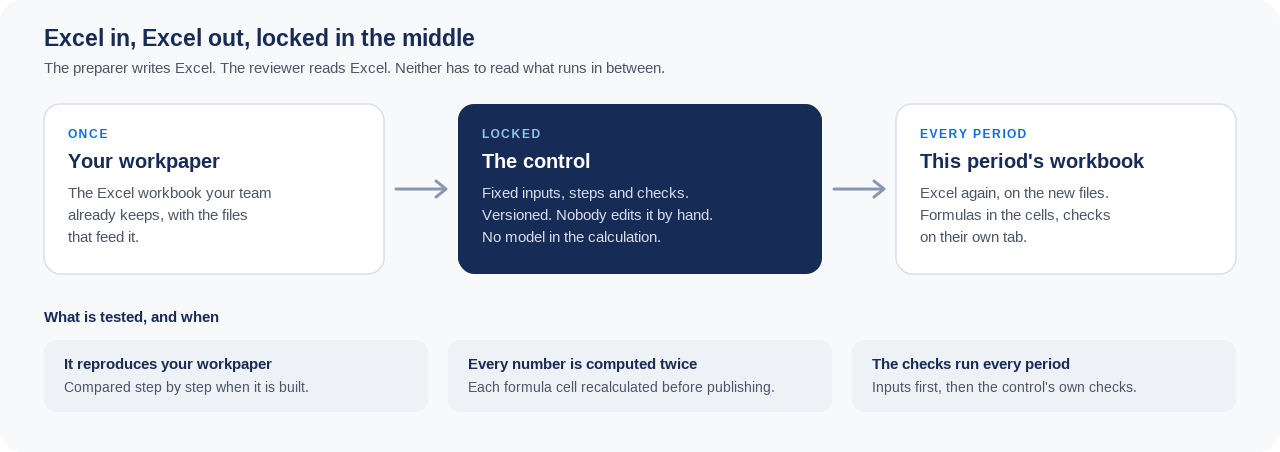
The preparer wrote Excel. The reviewer reads Excel. The part in between is the part neither of them has to read, and it is the part that can’t drift.
Why you can trust the middle
A locked box is only useful if you know it does what your workpaper did. Three things establish that.
- It has to reproduce your workpaper. The workbook you handed over is the answer key. The control is compared with it step by step, and differences come back in plain words, such as “37 rows differ on Amount.” The AI that builds the control doesn’t get to decide whether it is right. If you choose to accept a difference, that is recorded with your note.
- Every number is computed twice. The output cells carry real formulas, so you trace a number the way you always have. Before a control is published, we recalculate the whole workbook in a separate spreadsheet engine and compare every formula cell with the number the control computed. The two have to agree.
- The checks run every period. Each control carries named checks with a tolerance: debits equal credits, the posting ties to the source. The inputs are checked first, so a file that arrives with a missing column or duplicate keys stops the run.
One example
Take a month-end payroll accrual. The workpaper reads the pay register, works out the unpaid days at month end, accrues that share of the cost and books the reversal for the next day. In the workbook the accountant keeps, one column says the accrual percentage is the remaining days over the days in the pay period.
In the control, that is a formula written against column names: {Remaining Days}/{Pay Period Days}. In the workbook that comes back, it is an ordinary cell formula pointing at the two cells beside it. A reviewer clicks the cell and sees what they would have written themselves.
A reconciliation tab ties the posting totals back to the register, and a check confirms the accrual and its reversal net to zero. Next month the same control runs on the new register. The workbook looks the same, with new numbers in it.
Where this stops
Two limits. Formulas are for calculations a person reviews. When a control runs over hundreds of thousands of rows, the workbook carries values and checks, because nobody opens a workbook with millions of live formulas.
And the formula comparison happens when a control is built, edited and published. It does not rerun every month. What runs every month are the input checks and the control’s own checks.
What to ask
If someone is automating part of your close, whether that is a vendor or a person on your own team, these are the questions I would start with.
- Can the person who signs off read the calculation without help?
- What was it tested against, and who decided it passed?
- Can it be changed without anyone knowing?
- Given the output, can I trace one number back to its inputs?
If the answer to the first one is no, the others matter a lot less.
- Microsoft Research, LAMBDA: The ultimate Excel worksheet function, January 2021. ↩
- Raymond Panko’s review of 88 audited operational spreadsheets found errors in 94% of them, as summarised in Spreadsheet Risk Management in Organisations. ↩
- Raymond Panko, What We Don’t Know About Spreadsheet Errors Today, which compares error rates in program statements and spreadsheet cells. ↩